
Thank you @AneesKhan for the update, I will let know you if I have any questions.
1 Like
Hi @AneesKhan, just to confirm with you that after I updated the expiration data through the admin portal for a trial activation, what is the best way to sync the updated expiration data on the client side with C#? Is there a method for me to call to get the expiration date?
Dear @Mingbo,
After updating the Expiration Date of a trial activation on the server side, call the ActivateLicense() function on the client side to have the changes reflected locally.
Once done, you can call GetTrialExpiryDate() to retrieve the updated trial expiry date timestamp.
Hi @AneesKhan thanks for your reply. Am I correct that calling ActivateLicense() would potentially create a new trial activation as you mentioned above? Or it has been fixed in the C# sdk that would only update the new expiration date?
Hi @Mingbo
As long as the machine fingerprint remains unchanged, calling ActivateLicense() again on the same machine will update the existing trial activation details, such as the expiration date, rather than creating a new trial activation.
Additionally, as previously communicated, a new function is planned in v5 that will just update the trial activation details, such as an extended expiry date. At this time, there is no confirmed ETA for its availability.
For any further assistance, please feel free to reach out to our support channel at support@cryptlex.com.
Kind regards,
Anees
I wanted to let you know that the latest version of LexActivator (3.41.0) has been released a few days ago and includes the new SyncTrialActivation() function.
This function allows you to perform a one-time sync with the Cryptlex servers to update local trial activation data, such as metadata updates or server-side trial expiration extensions.
For standard trial validation, IsTrialGenuine() remains sufficient. The new sync function is intended only for cases where an immediate update is required, and it is recommended not to include it as part of the regular trial validation flow.
We hope this functionality supports your intended workflow. For any further questions, please feel free to reach out to support@cryptlex.com
1 Like
Thank you @AneesKhan,
Such good news. I will keep you posted if there are any further questions.
Best,
Hi @AneesKhan
I am getting the same error “Client error” of the error code 92, under both new trial and expired trial conditions. All methods in the C# sdk works on my machine except this one. This is the first time I get this type of exception, any ideas?
Please let me know if I missed anything there.
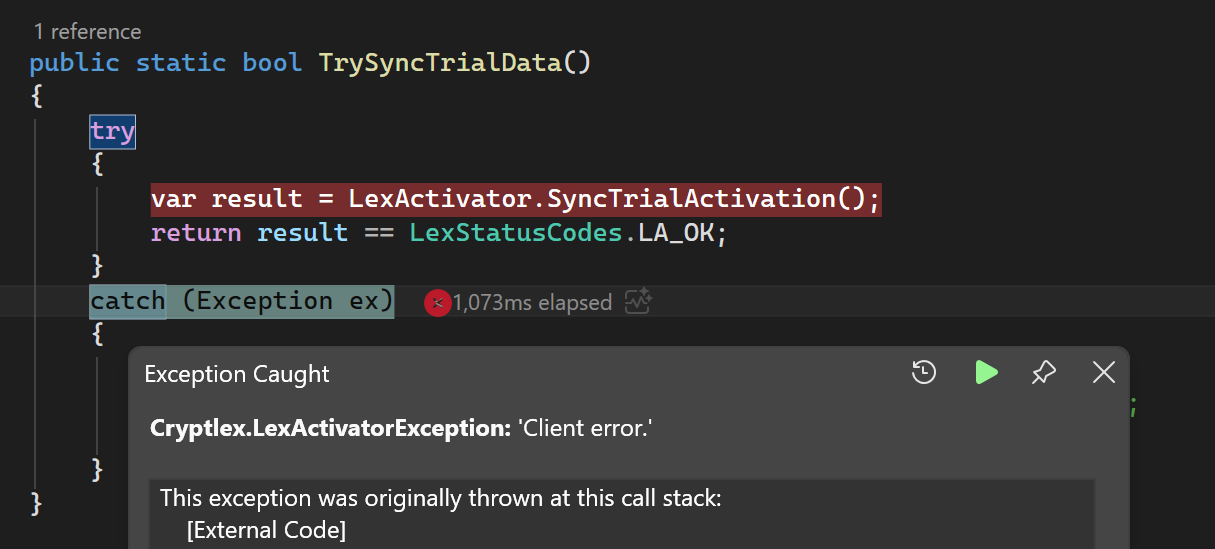
Could you please confirm the operating system in use?
Additionally, please update the product.dat and let us know if that resolves this error.
Hey @Mingbo,
You can either update the product.dat or upgrade to the latest released version of LexActivator (v3.41.1) or both.
Please keep us updated on the results.
Thank you.
Hi @AneesKhan, thanks for quick updates.
I can confirm that updating to the latest version of LexActivator (v3.41.1) fixes the issue.
Thanks again.
1 Like
You are very welcome and I am delighted to hear that the issue has been resolved.
Should you need any further help, please feel free to reach out to our support channel via support@cryptlex.com
Wishing you a wonderful day ahead!
1 Like